
Count it. Price it.
Bill it. Pay once.
CircuitCount turns a device count into a clean proposal in minutes, then runs the rest of your shop: bid board, job numbers, calendar, invoices and QuickBooks. It works with no signal and has no AI. From $79 a year or $199 once. No monthly rent. Ever.
No card. No account. Works on phone, tablet and computer.
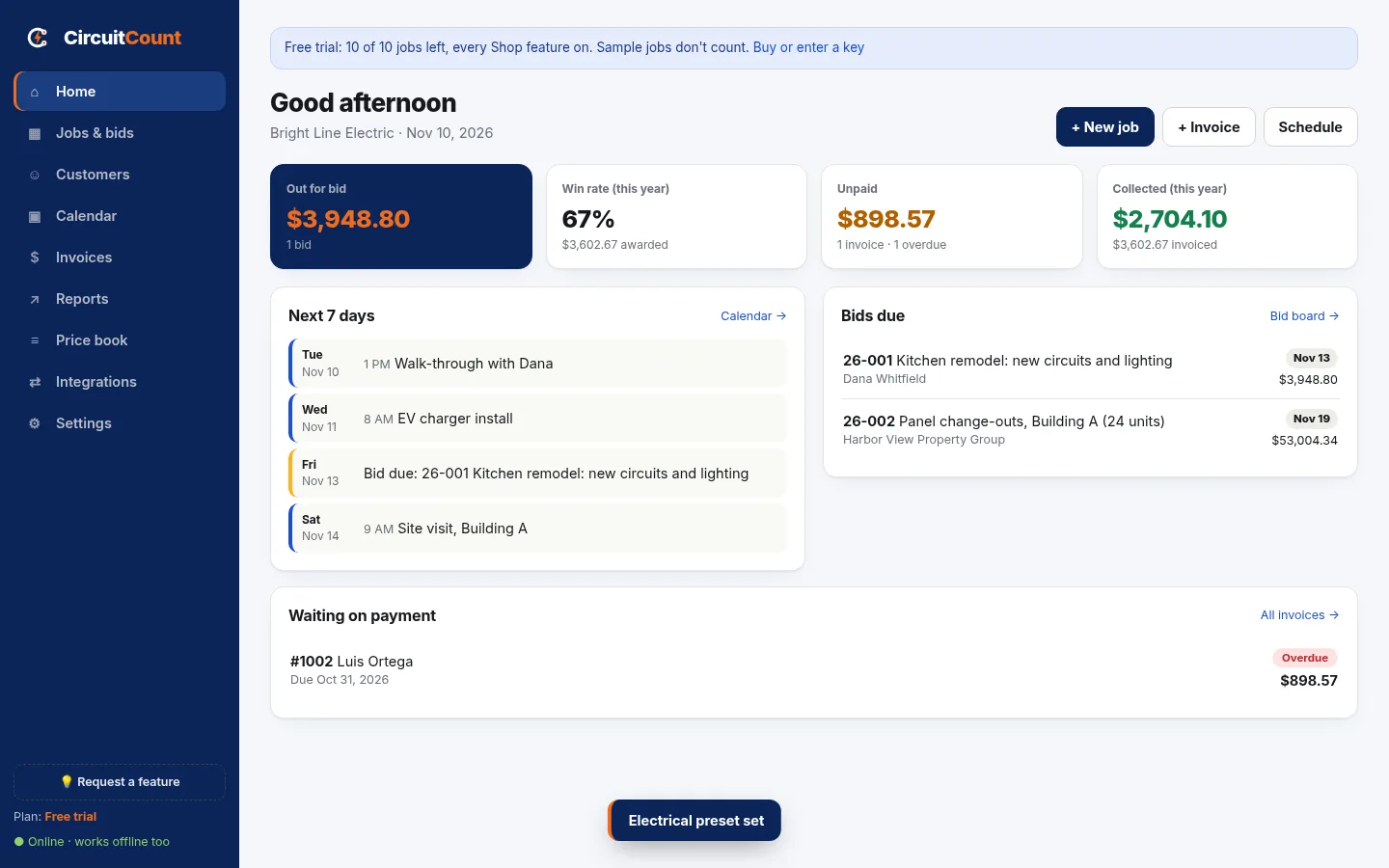
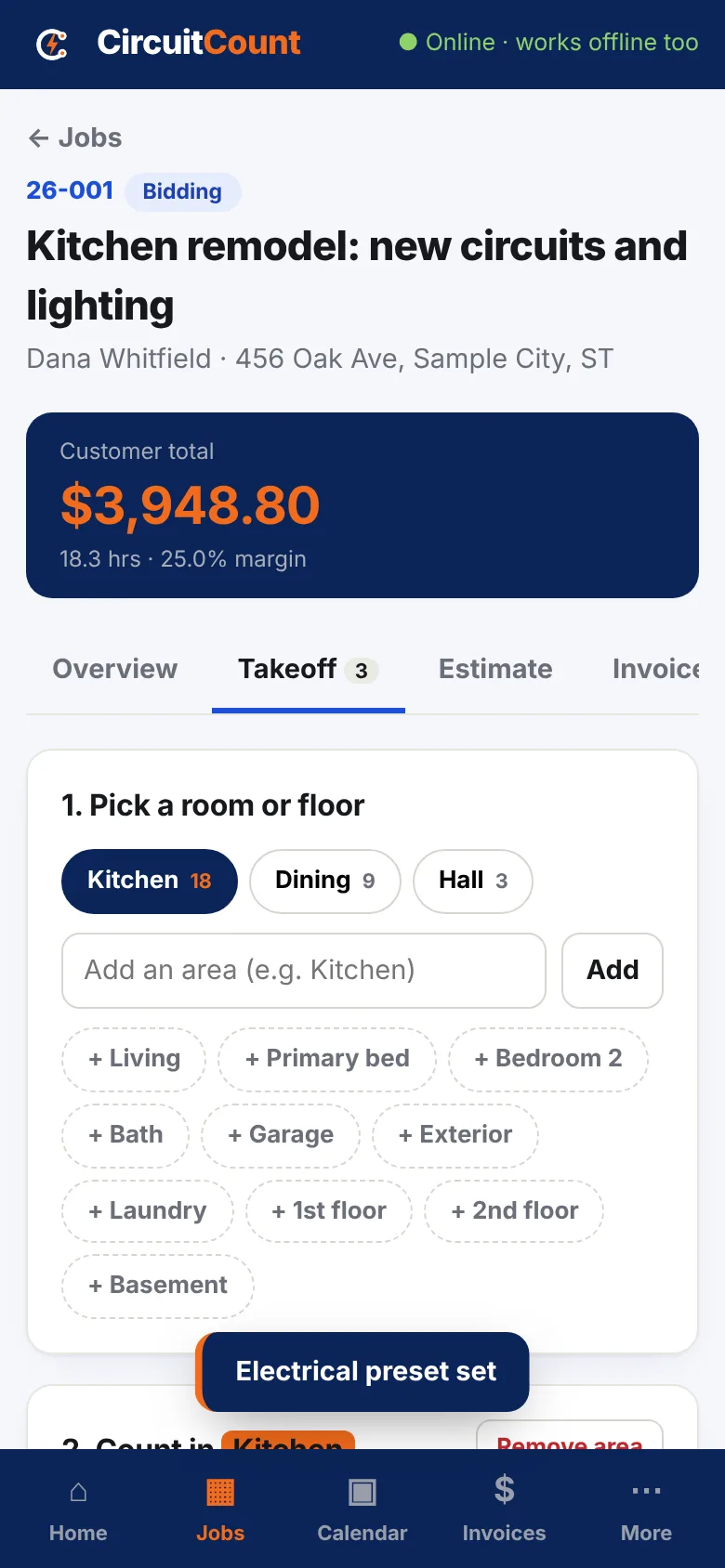
Stop running your shop out of five apps and a notebook.
Most small shops juggle a spreadsheet for bids, a texting app for scheduling, a separate invoicing app, and a monthly bill for each. Here's the switch.
Before
- Device counts on a notepad, then retyped at night
- Bids in a spreadsheet nobody updates
- Job numbers made up on the fly
- Invoices retyped from the estimate
- Three subscriptions and per-user fees
- No signal in the basement, no app
After CircuitCount
- Tap + per device, room by room. The estimate builds itself
- Bid board: Potential, Bidding, Awarded, Lost
- Auto job numbers by year: 26-001, 26-002...
- One tap turns the estimate into an invoice, to the penny
- From $79/year or $199 once. That's it
- Works fully offline. Your data stays on your device
Everything from bid to paid.
Built around the way a small shop actually works: walk it, count it, price it, win it, schedule it, bill it.
Count the job as you walk it
Add rooms or floors, then tap big + buttons for every receptacle, switch, light and circuit. Counts roll straight into the estimate with material and labor attached.
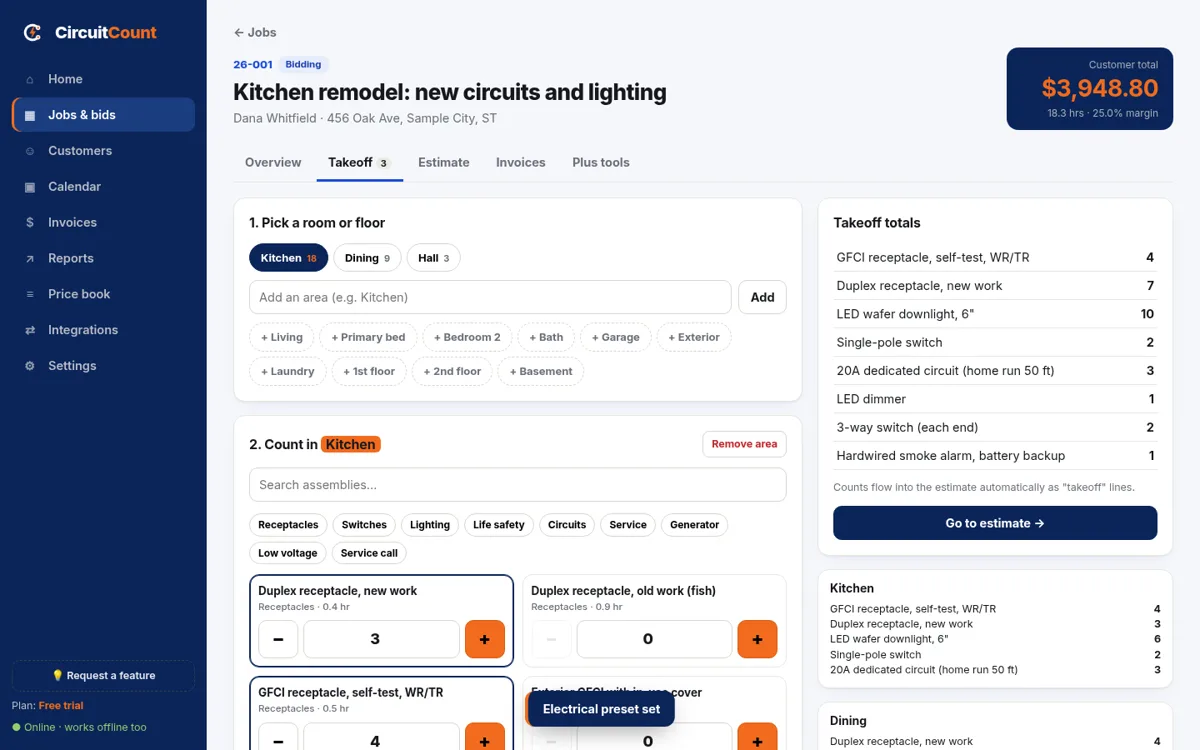
Real numbers, not guesses
One-tap assemblies, supply-house E / C / M units, overhead, margin and markup side by side, labor factors for attics and old work, multi-unit jobs, minimum charge and rounding.
Your logo. Your colors.
Branded proposal PDFs with scope, exclusions, terms and a signature line. Your costs stay on the internal takeoff sheet.
See every bid at a glance
Drag jobs from Potential to Bidding to Awarded or Lost. Bid due dates land on your calendar.
Your week in one place
Scheduled work, bids due and invoices due. Send any job to Google Calendar or Outlook in one tap.
Get paid faster
Invoice from the estimate in one tap, add your own Square or Stripe pay link, record payments, and export to QuickBooks Online or Desktop.
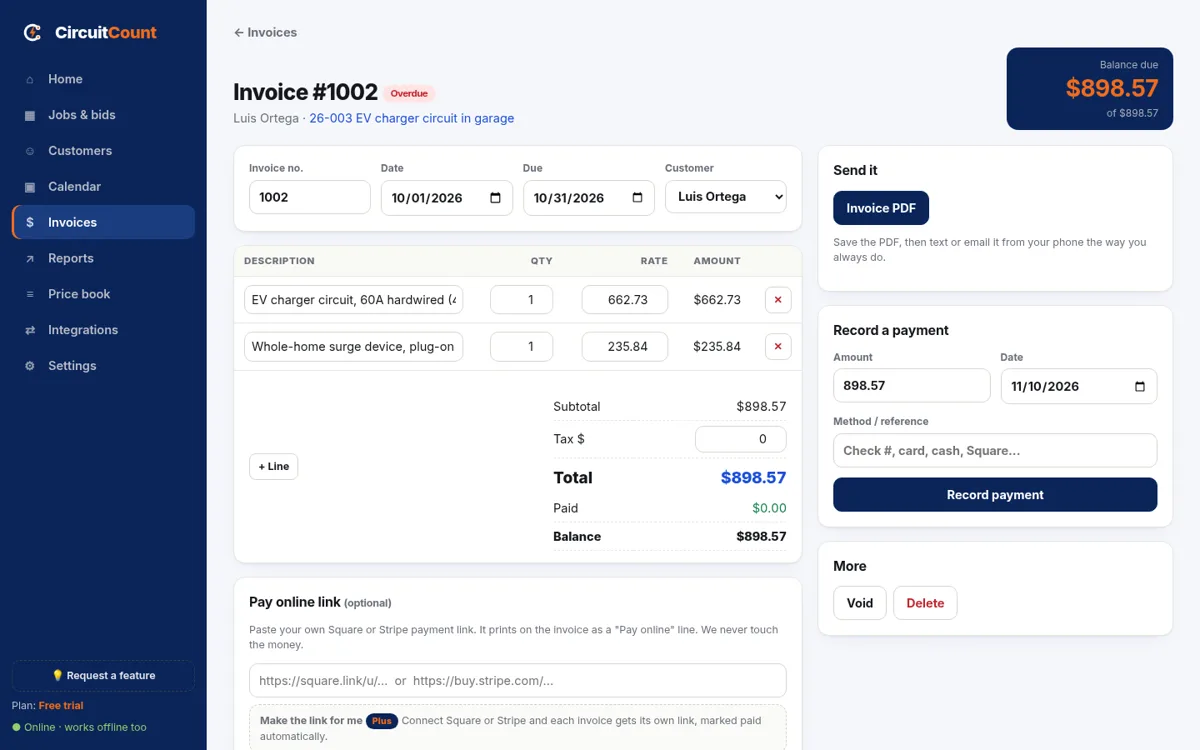
Know your numbers
Sales by month, win rate, bid pipeline, and who owes you, aged by 30 / 60 / 90 days.
Yours. Always.
Back up to a file or straight into your Google Drive or OneDrive folder. Export everything as CSV any time.
Electrical first. Not only.
A full electrical price book out of the box, plus starter packs for plumbing, HVAC and general contractors.
What the other apps charge you every year.
Published prices from each company's own pricing page, billed yearly, checked November 10, 2026. Theirs renew forever. CircuitCount doesn't.
| App | Published plans | Per year |
|---|---|---|
| CircuitCount Estimator | Estimates, proposals, bid board. Pay once. Works offline. | $79/yr or $199 once |
| CircuitCount Shop | Adds calendar, invoices, QuickBooks export. Up to 3 users. | $199/yr or $499 once |
| Jobber | Core $29/mo to Grow $149/mo, 1 user, +$29/mo per extra user | $348 to $1,788 |
| Housecall Pro | Basic $59/mo to Max $299/mo | $708 to $3,588 |
| Tradify | $47 to $61 per user per month | $564 to $732 per user |
| Joist | Pro to Run plans, billed yearly | $170 to $700 |
| ServiceTitan | No public prices, quote only | Not published |
Competitor prices: getjobber.com/pricing, housecallpro.com/pricing, tradifyhq.com/pricing, joist.com/pricing, servicetitan.com/pricing, checked November 10, 2026. Prices change; check each site. Those apps include features CircuitCount does not, such as online booking, dispatch and payment processing. CircuitCount is not affiliated with any of them.
Pay once. Keep working.
One-time charge through Square. No subscription, no auto-renew, no per-user fees. Pick the level that fits, try it free first.
Free trial
10 jobs, every Shop feature
- Full app, works offline
- Branded proposals and invoices
- No card, no account
Sample jobs don't count toward the 10.
By using the free trial, you agree to the Terms.
Estimator
or $199 once for a lifetime license
- Takeoffs and estimates
- Proposal + internal takeoff PDFs
- Price book, assemblies, CSV import
- Bid board + auto job numbers
- Customers, backup, CSV export
- 1 user · one-time charge
Lifetime = no end date for the version line you buy, as the terms of sale say. A later major version or a higher level may cost extra.
By buying, you agree to the Terms of Sale.
Shop
or $499 once for a lifetime license
- Everything in Estimator
- Calendar + Google / Outlook links
- Invoices, payments, pay links
- QuickBooks export, reports
- Drive / OneDrive folder backup
- Up to 3 users · one-time charge
Each user keeps their own data on their own device. Shared crew data and sync come with Plus later.
Lifetime = no end date for the version line you buy, as the terms of sale say. A later major version or a higher level (Plus, Ultra) may cost extra.
By buying, you agree to the Terms of Sale.
Plus
Shared crew data and sync between users
- Everything in Shop
- Field reports with photos
- Time tracking
- Change orders and permits
- Deposits and progress billing
- Live Square / Stripe / QuickBooks
Already have Estimator? Upgrade to Shop, pay the difference: 1 year → 1 year $120 (fresh 1 year from the upgrade date) · lifetime → lifetime $300 · 1 year → lifetime $420. In the app, open Settings › License & levels and tap Upgrade to Shop — pay the difference. Needs a paid Estimator key. By buying, you agree to the Terms of Sale.
Secure checkout by Square. Your key appears on screen right after payment. All sales are final: licenses are delivered instantly and are not refundable. Please try the free trial and the live demo first. See the terms of sale. Ultra (crews, cloud sync, customer portal) is coming later.
Questions electricians ask.
Is it really pay once? No monthly bill?
Yes. Estimator is $79 for a full year or $199 once. Shop is $199 for a full year or $499 once. A Lifetime License has no end date for the version line you buy. It is a one-time charge through Square and it never renews by itself.
What is the difference between Estimator and Shop?
Estimator is for bidding: takeoffs, estimates, branded proposal and internal takeoff PDFs, the price book and assemblies, a bid board, auto job numbers and customers. Shop adds the rest of the shop: calendar, invoices and payments, QuickBooks export, reports, and Google Drive / OneDrive folder backup. Shop also covers up to 3 users.
How many people can use one license?
Estimator: 1 user. Shop: up to 3 users (our Launch Special), so you, a helper and the office can each put the same key on their own phone, tablet or computer. Each user keeps their own data on their own device. Shared crew data and sync come with Plus later.
Can I move up from Estimator to Shop later?
Yes. Buy a Shop license and paste the new key. Everything you made stays where it is. Each level is its own license.
I already bought CircuitCount. Does my key still work?
Yes. Keys bought before this update keep working and open the Estimator level, with no end date change. Your estimates come over the first time you open the new app.
Does it work with no signal?
Yes. After the first visit it runs fully offline, in basements, crawlspaces and dead zones. Your data saves on your device.
Is this AI?
No. It is a plain calculator built around how electricians price work: assemblies, supply-house units, labor hours, overhead and margin. The same inputs always give the same price.
Which trades is it for?
Electrical gets a full starter price book: 995 materials and 35 assemblies with labor hours. Plumbing, HVAC and general contractors get starter labor items and the same estimating engine; add your own prices once.
Can I use my own supplier prices?
Yes. Edit any cost, or import a CSV from your supply house. Prices can be entered per each (E), per 100 (C) or per 1,000 (M), the way supply-house invoices read.
Does it work with QuickBooks?
Yes, with Shop. Export invoices for QuickBooks Online (CSV import) or QuickBooks Desktop (IIF), plus a customer list. Live two-way sync is planned for a later level.
Can I put my own logo and colors on proposals and invoices?
Yes. Upload your logo, pick your colors and font, add license numbers, footer, terms and payment terms once, with a live preview. It prints on every proposal, takeoff, invoice and report.
How do customers pay me?
With Shop, paste your own Square or Stripe payment link on any invoice and it prints as a Pay online line. The money goes straight to you. We never touch it and take no cut.
Where is my data? Who can see it?
On your device only. We do not receive your jobs, customers, estimates or invoices. Back up to a file any time and export everything as CSV.
What happens when my yearly license ends?
Nothing is deleted. You can still open, print and back up everything. Creating new jobs, invoices and customer proposals turns back on when you enter a new key.
Can I try it first?
Yes. The free trial covers 10 jobs with every Shop feature, no card and no account. Sample jobs don't count. All sales are final, so please try it first.
What if I need a feature you don't have?
Tap Request a feature in the app. We reply with a plan and a price before any work starts, and you decide.
Your next bid could be out the door tonight.
Start free with 10 jobs. No card, no account, no monthly rent.